Financial Dashboard
View revenue summaries, outstanding invoices, and treasury status at a glance
Overview
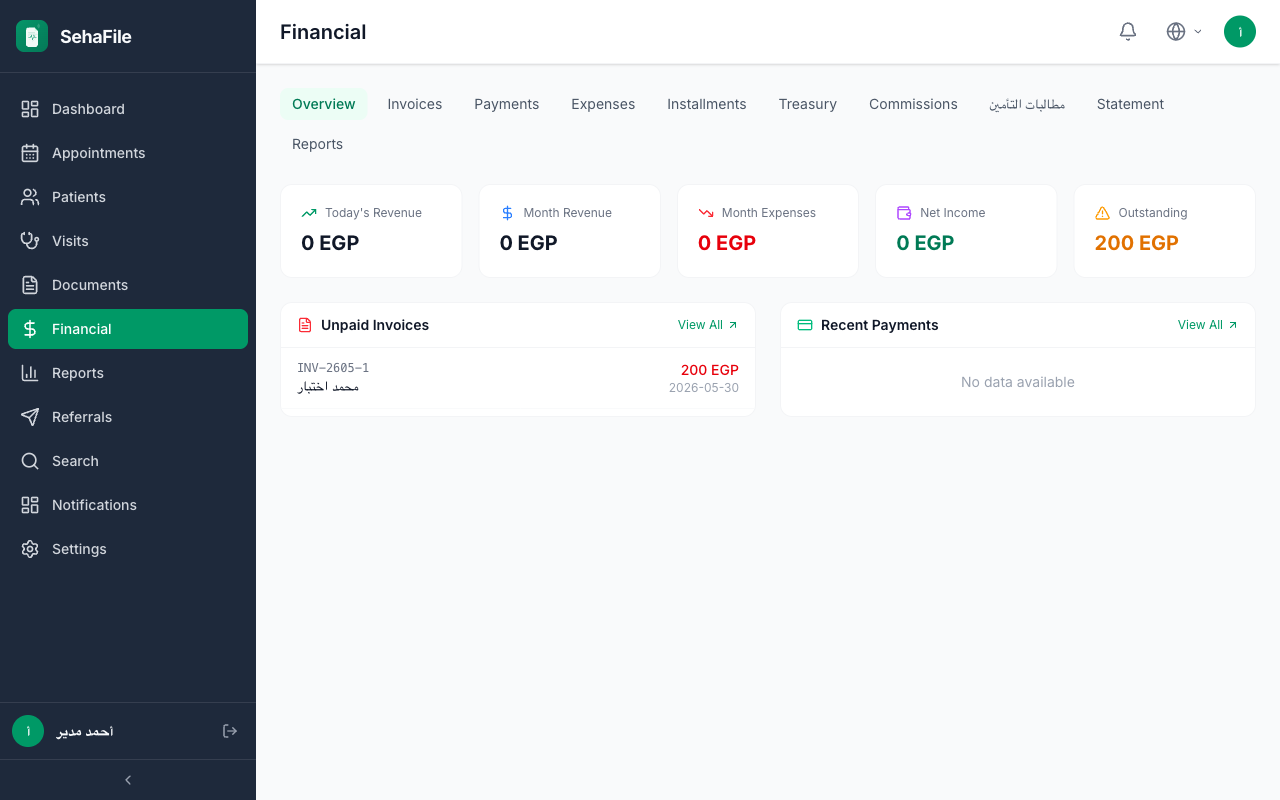
The Financial Dashboard in SehaFile provides clinic administrators and accountants with a real-time snapshot of the clinic's financial health. It consolidates today's revenue, monthly revenue, expenses, outstanding balances, and net income into a single view, enabling quick decision-making without diving into detailed reports.
Accessing the Financial Dashboard
- Navigate to the Financial Module: From the main sidebar menu, click Financial (المالية). The dashboard is the default landing page for users with the admin or financial role.
- Review Key Metrics: The dashboard displays six primary cards:
- Today's Revenue (إيرادات اليوم) - Total payments collected today
- Monthly Revenue (إيرادات الشهر) - Payments from the 1st of the current month to today
- Today's Expenses (مصروفات اليوم) - Expenses recorded for today
- Monthly Expenses (مصروفات الشهر) - Expenses from month start to today
- Outstanding Total (إجمالي المستحقات) - Sum of all unpaid and partially paid invoices
- Net Income (صافي الدخل) - Monthly revenue minus monthly expenses
- Filter by Branch: If your clinic has multiple branches, use the Branch dropdown at the top-right corner to filter all dashboard metrics to a specific branch. Selecting "All Branches" resets the view to clinic-wide totals.
Understanding the Metrics
Revenue Calculation
Revenue figures are computed from the Payments table, summing all recorded payments (cash, card, bank transfer, or insurance) within the selected time frame. This reflects actual collected cash rather than invoiced amounts.
Outstanding Balance
The outstanding total aggregates all invoices with a status of unpaid or partial, calculating the difference between invoice totals and amounts already paid. This helps you identify collection gaps quickly.
Net Income
Net income is a simple profit indicator: monthly payments received minus monthly expenses recorded. For a full profit-and-loss breakdown by category, use the Financial Reports section.
Tip: The dashboard refreshes data each time you navigate to it. For real-time monitoring during busy hours, keep the Financial Dashboard tab open and refresh periodically.
Warning: The dashboard only reflects payments that have been formally recorded in the system. If a receptionist collects cash but does not log it as a payment, it will not appear in revenue totals.
Financial Dashboard showing today's and monthly revenue, expenses, outstanding total, and net income cards with branch filter
Frequently Asked Questions
Can I see revenue from a previous month?
The dashboard always shows the current month. For historical data, navigate to Financial > Reports > Revenue Report and set custom date ranges.
Why does my net income show a negative number?
A negative net income means your recorded expenses exceed collected payments for the month. Check if large expenses (like salaries or equipment purchases) have been logged, or if payments are delayed.
Does the outstanding total include voided invoices?
No. Only invoices with status unpaid or partial are included. Voided invoices are excluded from outstanding calculations.
Can receptionists see the financial dashboard?
No. The financial module requires either the admin or financial role. Receptionists can only record payments through the visits workflow.
Was this article helpful?
Related Articles
Creating Invoices
Create detailed invoices with line items, discounts, taxes, and insurance coverage
🏥Invoice from Visit
Auto-generate invoices from completed visits including all procedures and tests
💳Recording Payments
Record patient payments with multiple methods including cash, card, and bank transfer